
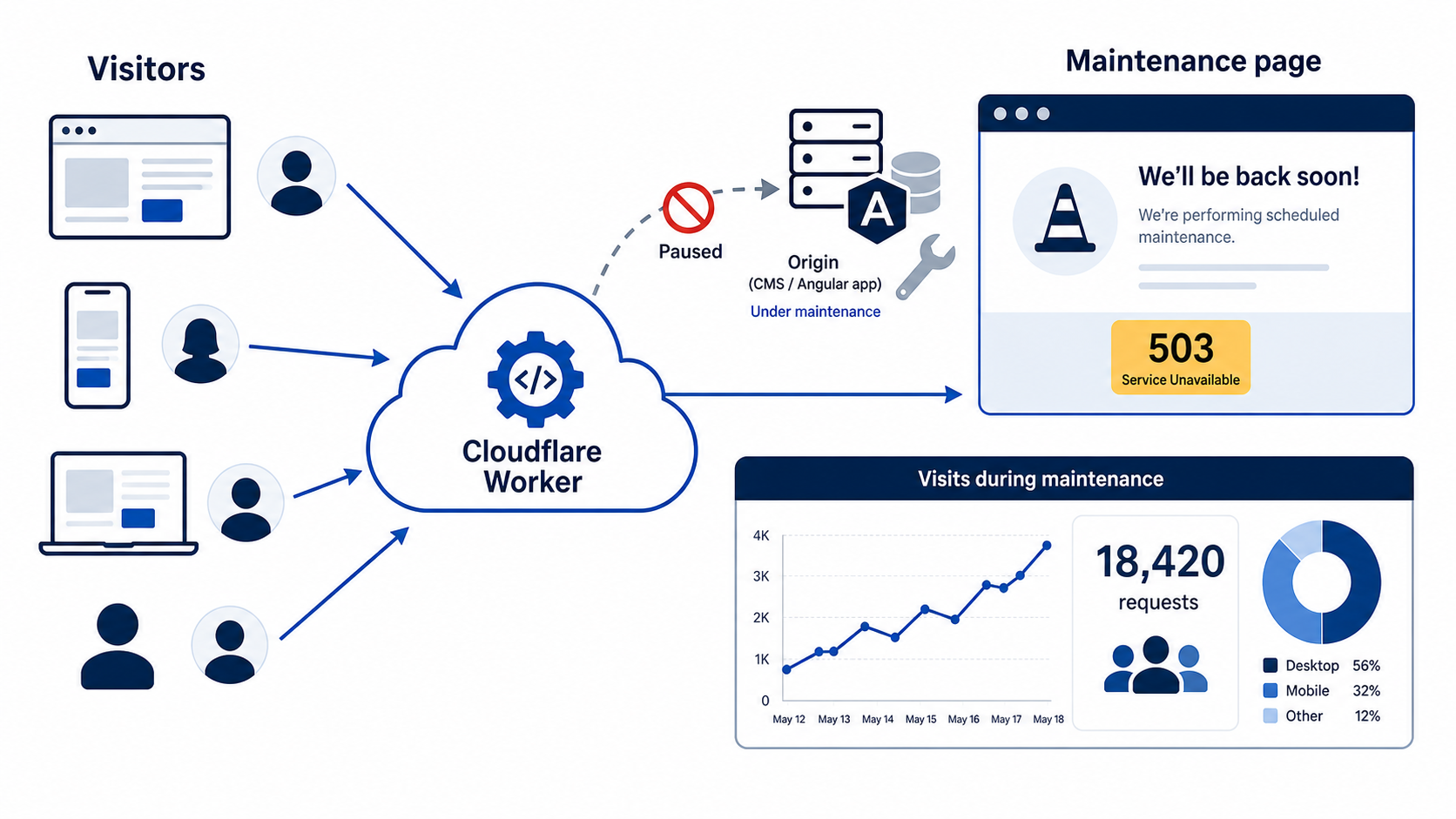
How to keep an Angular SPA and CMS-backed website communicative during downtime – and measure maintenance traffic without relying on the systems currently being repaired.
Planned maintenance is one of the few situations in which a website needs to remain available precisely when its primary application cannot be trusted. The CMS may be deploying, the database may be migrating, a backend dependency may be unhealthy, or an incident may require isolating the origin altogether.
For a modern web estate built from an Angular single-page application (SPA), a CMS, and Cloudflare-hosted static assets, the right answer is not another CMS maintenance plug-in. The maintenance experience should live at the edge, outside the failure domain of the systems being maintained.
This article describes an architecture that serves a small static maintenance page from Cloudflare while collecting useful, privacy-conscious traffic data about the interruption.
The design goal
The objective is straightforward:
- Keep a clear public page online even if the SPA, CMS, APIs, or origin infrastructure is unavailable.
- Return the correct HTTP semantics for a temporary outage.
- Measure the scale and shape of visitor traffic during the window.
- Avoid making the maintenance page depend on analytics tags, CMS code, third-party assets, or a working origin.
- Make activation and rollback fast, controlled, and repeatable.
The key architectural decision is to place maintenance logic in a Cloudflare Worker. The Worker sits at the edge, before requests reach the application. In normal operation it serves or forwards traffic as usual; during maintenance it returns a self-contained static response.
Cloudflare Workers can be deployed together with static assets. Static assets such as HTML, CSS, images, and JavaScript are delivered from Cloudflare’s network, while the Worker provides routing and runtime logic.
Reference architecture

This architecture intentionally separates the two planes:
- The application plane contains the Angular SPA, CMS, APIs, data services, and origin infrastructure.
- The continuity plane contains the maintenance Worker, a small static page, an activation flag, and edge-side telemetry.
When the application plane fails or is deliberately taken offline, the continuity plane should remain unaffected.
Serving the Angular SPA normally
An Angular SPA generally needs two kinds of routing:
- Requests for real files such as JavaScript bundles, CSS, images, fonts, and
index.htmlshould be served as static assets. - Browser navigation to a client-side route such as
/products/exampleshould returnindex.html, after which Angular’s router renders the route.
Cloudflare Workers Static Assets supports SPA fallback behavior. When configured for single-page-application handling, navigation requests that do not match an actual static file can receive index.html with 200 OK.
A representative Worker configuration might look like this:
name = "public-web-edge"
main = "src/worker.ts"
compatibility_date = "2026-09-01"

[assets]
directory = "./dist/browser"
binding = "ASSETS"
not_found_handling = "single-page-application"
run_worker_first = true

[[analytics_engine_datasets]]
binding = "MAINTENANCE_EVENTS"
dataset = "maintenance_events"
The exact configuration depends on how the SPA and CMS are split. The important point is that the Worker runs before the static-asset fallback when maintenance decisions must be made globally. Otherwise, a request for an existing JavaScript file may bypass the Worker and leak a partial or broken application during the maintenance window.
Cloudflare static assets normally bypass Worker code when the requested file exists. A Worker can explicitly fetch assets through an assets binding when it decides that the request should proceed normally.
Turning maintenance mode on and off
There are two common ways to activate the design.
Pattern 1: Route switch
Attach a dedicated maintenance Worker route, such as www.example.com/*, only for the duration of maintenance.
This is easy to understand and makes a good emergency fallback. The downside is that it changes routing state at the same time as the incident or deployment, and it is less convenient for repeatable operations.
Pattern 2: Permanently routed Worker with a flag
Keep the Worker attached to the public route all the time. A maintenance flag determines whether requests are served from the normal application path or from the static maintenance response.
The flag can be a Worker environment variable for deployment-driven changes, or a centrally managed value such as a KV record for rapid operational switching. The flag should include context, not just a boolean:
{
  "enabled": true,
  "incidentId": "CHG-2026-09-001",
  "messageVariant": "planned",
  "retryAfterSeconds": 1800,
  "startedAt": "2026-09-01T17:00:00Z"
}
For most teams, the permanently routed Worker is the better long-term pattern:
- It is already deployed and exercised before an outage.
- Activation does not require changing DNS or reassigning application routes.
- The same workflow supports planned maintenance and unplanned incidents.
- The incident identifier travels with every analytics event.
- A route-level fallback can still exist for exceptional cases.
Treat the flag update as an operational action: authenticate it, audit it, restrict permissions, and automate it through the team’s normal deployment or change-management process.
The maintenance response
A maintenance response should not be a normal successful page. It should return HTTP 503 Service Unavailable, which communicates that the condition is temporary. Include Retry-After if the expected retry interval is known; the header gives clients and crawlers a signal about when to try again.
HTTP/1.1 503 Service Unavailable
Content-Type: text/html; charset=utf-8
Cache-Control: no-store, max-age=0
Retry-After: 1800
X-Maintenance-Incident: CHG-2026-09-001
Cache-Control: no-store is a conservative default. It helps prevent browsers and intermediary caches from showing a stale maintenance page after the service has recovered. In some environments a short, carefully tested cache policy may be acceptable, but recovery behavior must be part of the test plan.
The page itself should be deliberately small and self-contained:
- Inline the critical CSS.
- Use a local SVG or no logo rather than an origin-hosted image.
- Do not load CMS templates, web fonts, tag managers, consent-management code, or third-party scripts.
- Provide a clear, approved message and a realistic retry expectation.
- Include only contact or status links that are independently available.
- Meet accessibility basics: semantic headings, sufficient contrast, keyboard-friendly links, and a page title.
A maintenance page is incident infrastructure. Its dependencies should be fewer than the dependencies of the application it replaces.
A Worker flow
At a high level, the Worker does four things:
- Read the maintenance state.
- If maintenance is active, record an event asynchronously and return the static 503 response.
- If maintenance is disabled, serve the SPA’s normal static assets or proxy to the relevant CMS/API origin.
- Handle
HEADrequests correctly by returning headers without an HTML body.
Illustrative TypeScript-style pseudo-code:
export default {
  async fetch(request: Request, env: Env, ctx: ExecutionContext) {
    const url = new URL(request.url);
    const state = await env.MAINTENANCE_STATE.get("public-web", "json");

    if (state?.enabled && !isBypassed(request, env)) {
      ctx.waitUntil(recordMaintenanceEvent(request, state, env));

      const headers = new Headers({
        "Content-Type": "text/html; charset=utf-8",
        "Cache-Control": "no-store, max-age=0",
        "Retry-After": String(state.retryAfterSeconds ?? 1800),
        "X-Maintenance-Incident": state.incidentId
      });

      if (request.method === "HEAD") {
        return new Response(null, { status: 503, headers });
      }

      return new Response(renderMaintenanceHtml(state), {
        status: 503,
        headers
      });
    }

    if (shouldGoToCms(url)) {
      return fetch(cmsOriginRequest(request, env));
    }

    return env.ASSETS.fetch(request);
  }
};
This example is intentionally simplified. Production code should validate configuration, protect the management path, classify routes carefully, avoid logging sensitive request data, and have explicit behavior for failures while reading maintenance state.
What to measure
The phrase “number of users” needs precision. A maintenance page can reliably count requests. It cannot automatically know how many unique humans visited without introducing an identifier, cookie, or other approximation.
Start with operationally reliable metrics:
| Metric | Meaning | Recommended? |
|---|---|---|
| Maintenance responses | Number of 503 responses served by the Worker | Yes |
| Request rate | Requests per minute during the interruption | Yes |
| Hostname | Which public hostname received traffic | Yes |
| Path group | Which high-level route type visitors requested | Yes |
| Request method | GET, HEAD, and other request patterns | Yes |
| Country/region | Geographic distribution, subject to policy | Usually |
| User-agent category | Likely browser, bot, or monitoring request | Usually |
| Referrer category | Direct, search, social, internal, or other | Optional |
| Approximate unique browser | Cookie-based estimate of visitors | Optional, later |
The first release should distinguish traffic volume from people. Report, for example, “the maintenance page served 18,420 requests,” not “18,420 users visited,” unless a distinct unique-visitor method has been reviewed and implemented.
Analytics Engine as the event store
Cloudflare provides Worker metrics for aggregate Worker traffic and Workers Analytics Engine for custom telemetry written by Worker code. Analytics Engine accepts data points from the Worker and supports querying the resulting event dataset.
An event schema should be small, purposeful, and stable. Each maintenance response can write one record like this:
Event: maintenance_response

Index dimensions
- hostname: www.example.com
- incident_id: CHG-2026-09-001
- path_group: home | content | search | account | other
- request_method: GET | HEAD
- client_class: browser | bot | monitoring | unknown

Numeric fields
- response_status: 503
- is_navigation: 0 or 1
- is_new_maintenance_cookie: 0 or 1, only if enabled
Use the incident_id as a first-class dimension. It supports precise incident reporting even when maintenance occurs multiple times in a day or across several hostnames.
The Worker can write analytics asynchronously, so event recording does not delay delivery of the fallback page:
function recordMaintenanceEvent(request: Request, state: MaintenanceState, env: Env) {
  const url = new URL(request.url);

  env.MAINTENANCE_EVENTS.writeDataPoint({
    indexes: [
      url.hostname,
      state.incidentId,
      classifyPath(url.pathname),
      request.method,
      classifyClient(request)
    ],
    doubles: [503, isNavigation(request) ? 1 : 0]
  });
}
The exact Analytics Engine binding and query model should be aligned with the current Cloudflare account configuration, retention requirements, and dataset conventions. The architectural principle remains the same: emit one minimal edge event for each maintenance response, then query by time range and incident ID.
Unique visitors: use restraint
A static page sees requests, not identities. Counting unique users by IP address is inaccurate and should not be used as a visitor metric: office networks, mobile carriers, VPNs, and shared proxies can all make many people appear as one address or one person appear as many.
If the business eventually needs an approximate unique-browser estimate, consider a short-lived first-party cookie created only for the maintenance window:
Set-Cookie: maintenance_visitor=<random-id>; Max-Age=86400; Path=/; Secure; HttpOnly; SameSite=LaxThe Worker would write a boolean such as new_cookie = 1 when it first creates the cookie, rather than storing the cookie value in analytics. This produces a useful approximation without sending a persistent raw identifier into the event stream.
Before enabling this, decide and document:
- The purpose of the metric.
- Cookie duration and deletion behavior.
- Whether consent, privacy notice, or regional controls apply.
- Data-retention requirements.
- Whether aggregate request counts already answer the operational question.
In many incident reviews, total requests, route mix, bot share, and request rate are more actionable than a questionable “unique users” number.
Bypass and control design
Maintenance mode cannot block the people responsible for restoring service. However, bypass mechanisms should not turn the outage page into an origin-exposure or security problem.
Preferred approaches include:
- Cloudflare Access protection for a dedicated administrative preview hostname.
- A tightly controlled identity-based policy for authorized responders.
- A separate maintenance preview route unavailable to ordinary visitors.
- Explicit allow-listing for independent uptime monitors if those monitors must continue to test the origin.
Security note: Avoid a broadly shared secret query string, a permanent public cookie, or a simple client-controlled header as a bypass mechanism. Also avoid hardcoding personal IP addresses as the only path back to the origin; they are brittle and difficult to audit.
The public maintenance response should be applied only to approved hostnames and path groups. Critical authenticated services, APIs, legal pages, or status services often need their own availability plan rather than being swept into a global /* rule.
Deployment and testing
A robust solution is pre-deployed and tested before it is needed.
Build pipeline
- Build the Angular application into static files.
- Build or package the maintenance HTML as part of the Worker deployment.
- Deploy Worker code, static assets, and configuration together where practical.
- Keep the Worker, templates, tests, and infrastructure configuration in source control.
- Promote the same artifact through development, staging, and production.
Cloudflare Workers Static Assets deploys static files and Worker logic together as an integrated deployment unit, which reduces configuration drift between the page and the code that decides when to serve it.
Test cases
- Normal SPA navigation returns
index.htmland Angular routing still works. - Existing static assets return normally when maintenance is off.
- CMS routes and API routes continue to use their expected origin paths when maintenance is off.
- Maintenance mode returns 503 for
GETrequests. - Maintenance mode returns 503 with no response body for
HEADrequests. Retry-Afterand cache-control headers are correct.- No maintenance page asset depends on the primary origin.
- Analytics events appear with the expected incident ID and route classification.
- Approved responders can use the bypass path, while unauthorised requests cannot.
- Disabling maintenance restores normal content without stale 503 responses.
- The page remains usable if the CMS, origin, analytics service, and external tag providers are all unavailable.
Test the last case deliberately. A maintenance mechanism that is validated only while the origin is healthy has not really been tested.
Post-maintenance reporting
After maintenance ends, query events using the incident ID and publish a concise operational summary:
Incident: CHG-2026-09-001
Window: 17:00–17:42 UTC
Maintenance responses: 18,420
Peak rate: 1,060 requests/minute
Top requested route groups: home, search, account
Client mix: browser 71%, bot 24%, monitoring 5%
Recovery check: normal SPA asset and CMS route responses verified
This report supports operational learning without requiring third-party analytics tags or a dependency on the application being offline.
Closing recommendation
For an Angular SPA backed by a CMS, serve maintenance mode from a permanently routed Cloudflare Worker with a controlled feature flag. The Worker should return a self-contained 503 Service Unavailable page, include a realistic Retry-After value, and emit minimal per-response events to Workers Analytics Engine.
Keep the first version deliberately narrow: count maintenance responses, record the incident ID and a few operational dimensions, and avoid unique-user identifiers unless they have a genuine decision-making purpose. This architecture makes the maintenance page a reliable edge service rather than a fragile feature of the application that is currently being repaired.