
How I built a serverless order monitoring system with Cloudflare Workers that polls Allegro’s API every 3 minutes and triggers webhooks for new orders — all for $0/month.
The Story So Far
Remember a month ago when I built that order notification system and had a lion roar every time a new order came in? Well, I’ve learned a few things since then.
The DND Problem 😴
In the meantime, I learned something important: I needed to set up Do Not Disturb. I don’t understand how, but many parents were ordering books for their children at 1 AM or 7 in the morning! 😅
Or when I was in meetings — I added a simple modification so the iPhone shortcut wouldn’t play the sound if DND was enabled or if it was outside 8 AM – 10 PM hours.
Lesson learned: When you’re running an online business, orders come at all hours. You need smart notification filtering, not just loud sounds!
Enter Allegro 🇵🇱
But it turned out that orders were also coming from Allegro — Poland’s most popular marketplace (think of it as the Polish Amazon). To maintain a good seller rating, I need to respond quickly to customers and ship packages fast.
The problem? Allegro doesn’t offer push notifications or webhooks like Shopify or WooCommerce do. But they do have a REST API that allows up to 9,000 requests per minute.
The Challenge: How do I get real-time notifications from an API that doesn’t support webhooks?
The Solution: Poll the API regularly and trigger my own webhooks when new events appear.
Building with Cloudflare Workers ⚡
I asked AI to help create a new solution that would monitor Allegro orders and trigger the same webhook (the one WooCommerce calls) when a new order appears.
AI wrote the application quite quickly — I suggested using Cloudflare Workers and KV database — lately, this has been my favorite environment for this type of solution.
Why Cloudflare Workers?
- Free tier: 100,000 requests/day (we use ~480/day)
- Global edge network: Low latency worldwide
- Built-in cron triggers: No need for external schedulers
- KV storage: Perfect for state persistence
- Zero cold starts: Always ready to respond
- Serverless: No servers to manage

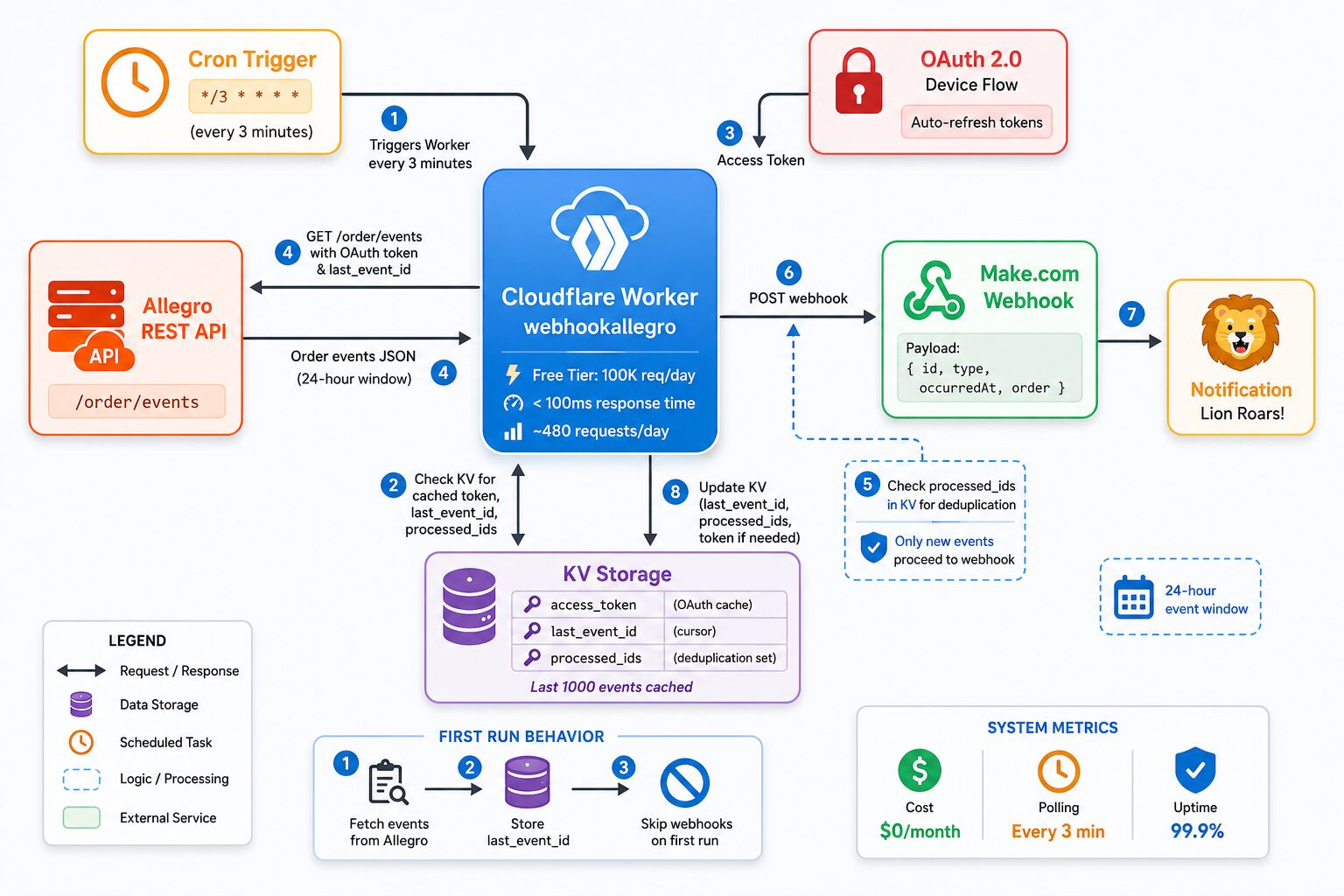
The Architecture 🏗️
The solution is beautifully simple:

Key Components:
- Cron Trigger: Runs every 3 minutes automatically
- OAuth2 Device Flow: Authenticates with Allegro API
- KV Storage: Stores last event ID and processed events
- Deduplication: Prevents duplicate notifications
- Webhook: Triggers Make.com automation
What We Learned 📚
We encountered a few interesting challenges along the way:
1. OAuth Flow Confusion
Initially, we tried using client_credentials grant, which doesn’t work for order endpoints. Allegro requires user context, so we switched to the device flow which is perfect for server-to-server applications.
// Device flow authentication
const deviceResponse = await fetch(
  `https://allegro.pl/auth/oauth/device?client_id=${CLIENT_ID}`,
  {
    method: 'POST',
    headers: {
      'Authorization': `Basic ${credentials}`,
      'Content-Type': 'application/x-www-form-urlencoded'
    }
  }
);

const { user_code, device_code, verification_uri } = await deviceResponse.json();

// User visits verification_uri and enters user_code
// Then poll for token:
const tokenResponse = await fetch('https://allegro.pl/auth/oauth/token', {
  method: 'POST',
  headers: {
    'Authorization': `Basic ${credentials}`,
    'Content-Type': 'application/x-www-form-urlencoded'
  },
  body: `grant_type=urn:ietf:params:oauth:grant-type:device_code&device_code=${device_code}`
});
2. User-Agent Header Required
Allegro’s API requires a specific User-Agent header format: AppName/Version (+URL). This is mandatory for all requests and helps Allegro identify your application.
const response = await fetch(url, {
  headers: {
    'Authorization': `Bearer ${accessToken}`,
    'Accept': 'application/vnd.allegro.public.v1+json',
    'User-Agent': 'webhookallegro/1.0.0 (+https://github.com/plusz/webhook_allegro)'
  }
});
3. Old Events on First Run
The first version would send webhooks for all historical events. We added logic to skip old events on initialization and only process events from the last 24 hours.
async function processEvents(events, env, isFirstRun) {
  if (isFirstRun) {
    // Just store the last event ID, don't send webhooks
    const lastEvent = events[events.length - 1];
    await env.ALLEGRO_KV.put('last_event_id', lastEvent.id);
    console.log(`First run: Stored last event ID, skipped ${events.length} old events`);
    return;
  }

  // Filter events from last 24 hours
  const oneDayAgo = Date.now() - (24 * 60 * 60 * 1000);
  const newEvents = events.filter(event => {
    const eventTime = new Date(event.occurredAt).getTime();
    return eventTime >= oneDayAgo;
  });

  // Process new events...
}
4. Webhook Payload Format
Make.com was rejecting our initial payload with HMAC signatures. We simplified it to just send the raw event data:
async function sendWebhook(event, env) {
  const payload = {
    id: event.id,
    type: event.type,
    occurredAt: event.occurredAt,
    order: event.order
  };

  const response = await fetch(env.WEBHOOK_URL, {
    method: 'POST',
    headers: {
      'Content-Type': 'application/json'
    },
    body: JSON.stringify(payload)
  });

  if (!response.ok) {
    throw new Error(`Webhook failed: ${response.status}`);
  }
}
5. Token Caching & Auto-Refresh
We implemented proper OAuth token caching in KV storage with automatic refresh, so we’re not hitting the auth endpoint unnecessarily:
async function getAccessToken(env) {
  // Check cache first
  const cachedToken = await env.ALLEGRO_KV.get('access_token', { type: 'json' });

  if (cachedToken && cachedToken.expires_at > Date.now()) {
    return cachedToken.access_token;
  }

  // Refresh token
  const response = await fetch('https://allegro.pl/auth/oauth/token', {
    method: 'POST',
    headers: {
      'Authorization': `Basic ${credentials}`,
      'Content-Type': 'application/x-www-form-urlencoded'
    },
    body: `grant_type=refresh_token&refresh_token=${env.ALLEGRO_REFRESH_TOKEN}`
  });

  const data = await response.json();

  // Cache for next time
  await env.ALLEGRO_KV.put('access_token', JSON.stringify({
    access_token: data.access_token,
    expires_at: Date.now() + (data.expires_in - 60) * 1000
  }));

  return data.access_token;
}
The Complete Worker Code 💻
Here’s the main worker structure:
export default {
  // Cron trigger - runs every 3 minutes
  async scheduled(event, env, ctx) {
    ctx.waitUntil(checkAllegroOrders(env));
  },

  // HTTP endpoint for manual triggers
  async fetch(request, env) {
    if (request.method === 'GET') {
      return new Response('Allegro Order Monitor is running', { status: 200 });
    }

    await checkAllegroOrders(env);
    return new Response('Manual check triggered', { status: 200 });
  }
};

async function checkAllegroOrders(env) {
  try {
    // 1. Get OAuth token (cached or refresh)
    const accessToken = await getAccessToken(env);

    // 2. Fetch events from Allegro
    const result = await fetchAllegroEvents(accessToken, env);

    // 3. Process new events
    if (result && result.events && result.events.length > 0) {
      await processEvents(result.events, env, result.isFirstRun);
    }

    console.log(`Checked Allegro orders at ${new Date().toISOString()}`);
  } catch (error) {
    console.error('Error checking Allegro orders:', error);
  }
}
Event Deduplication 🔄
To prevent duplicate notifications, we store the last 1000 processed event IDs in KV:
async function processEvents(events, env, isFirstRun) {
  const processedIds = await getProcessedIds(env);
  const newEvents = [];

  for (const event of events) {
    if (!processedIds.has(event.id)) {
      newEvents.push(event);
      processedIds.add(event.id);
    }
  }

  // Send webhooks for new events
  for (const event of newEvents) {
    await sendWebhook(event, env);
    console.log(`✅ Processed event ${event.id} of type ${event.type}`);
  }

  // Update storage
  await saveProcessedIds(processedIds, env);
}
Deployment 🚀
Deploying is incredibly simple with Wrangler CLI:
# 1. Authorize with Allegro (one-time)
node device-auth.js

# 2. Create KV namespace
wrangler kv namespace create "ALLEGRO_KV"

# 3. Set secrets
wrangler secret put ALLEGRO_CLIENT_ID
wrangler secret put ALLEGRO_CLIENT_SECRET
wrangler secret put ALLEGRO_REFRESH_TOKEN
wrangler secret put WEBHOOK_URL

# 4. Deploy
wrangler deploy

# 5. Monitor logs
wrangler tail
✅ Deployment successful!
The worker is now running on Cloudflare’s edge network, checking for new orders every 3 minutes.
Why This Pattern Works 🎯
I also have a Base.com integration, but it checks orders every 10 minutes, and the Cloudflare solution is more universal — I can hook into any API.
Benefits of This Approach:
- Universal: Works with any API that doesn’t support webhooks
- Reliable: Cloudflare’s global network ensures high availability
- Cost-effective: Free tier covers most use cases
- Scalable: Can handle thousands of requests per day
- Maintainable: Simple code, easy to understand and modify
- Secure: All secrets stored in Cloudflare, not in code
Now the Lion Roars for Any Channel 🦁
Now the lion roars when an order comes from any channel:
- ✅ WooCommerce (native webhooks)
- ✅ Allegro (polling with this solution)
- ✅ Any future integration I add
The best part? This pattern works for any API that doesn’t support webhooks. Just poll, deduplicate, and forward. Simple, reliable, and free.
Monitoring & Troubleshooting 🔍
The solution includes comprehensive monitoring:
# Real-time logs
wrangler tail

# Check KV storage
wrangler kv key list --binding=ALLEGRO_KV
wrangler kv key get --binding=ALLEGRO_KV "last_event_id"

# Manual trigger for testing
curl -X POST https://webhookallegro.mute-surf-eede.workers.dev
Open Source! 🎉
The complete solution is now available as open source on GitHub. All sensitive data (API keys, webhook URLs) are stored in Cloudflare secrets, so the code itself is completely public and ready to use.📦 View on GitHub: plusz/webhook_allegro
What’s Included:
- ✅ Complete Cloudflare Worker source code
- ✅ Device flow authentication script
- ✅ Comprehensive documentation
- ✅ Troubleshooting guide
- ✅ Quick reference card
- ✅ Deployment checklist
Tech Stack 🛠️
- Cloudflare Workers – Serverless compute
- Cloudflare KV – State storage
- Allegro REST API – Order events
- Make.com – Webhook automation
- OAuth2 Device Flow – Authentication
Performance Metrics 📊

Future Improvements 🚀
Some ideas for future enhancements:
- Add support for other marketplaces (eBay, Etsy, etc.)
- Implement retry logic for failed webhooks
- Add Slack/Discord notification options
- Create a dashboard for monitoring
- Add analytics and reporting
Conclusion 🎬
Building this Allegro order monitoring system taught me several valuable lessons:
- Polling can be just as good as webhooks when done right
- Cloudflare Workers are perfect for this type of integration
- OAuth device flow is ideal for server-to-server apps
- Proper deduplication is crucial for reliability
- Good documentation makes projects maintainable
The solution is production-ready, costs $0/month, and handles all my Allegro orders reliably. And yes, the lion still roars! 🦁
Try it yourself!
Clone the repository, follow the setup guide, and have your own lion roaring in minutes.
https://github.com/plusz/webhook_allegro
Questions? Issues? Open an issue on GitHub or reach out!