The Problem: Calendar Management Chaos
Life is unpredictable. If you’re a parent, you know the struggle: your child’s school schedule changes, extracurricular classes get added, gym routines shift. If you’re a student, professors send updated timetables mid-semester. Suddenly, you need to update not just your calendar, but also inform family members and sync everything across multiple devices and platforms.
The manual approach? It’s a nightmare of clicking and dragging:
- Opening Outlook
- Creating individual calendar entries
- Switching between Outlook and Google Calendar
- Manually calculating event times (5 minutes before class, 15 minutes after? That’s custom math for each event)
- Repeating events weekly or fixing them when schedules change
- Re-doing everything when the family calendar needs updating
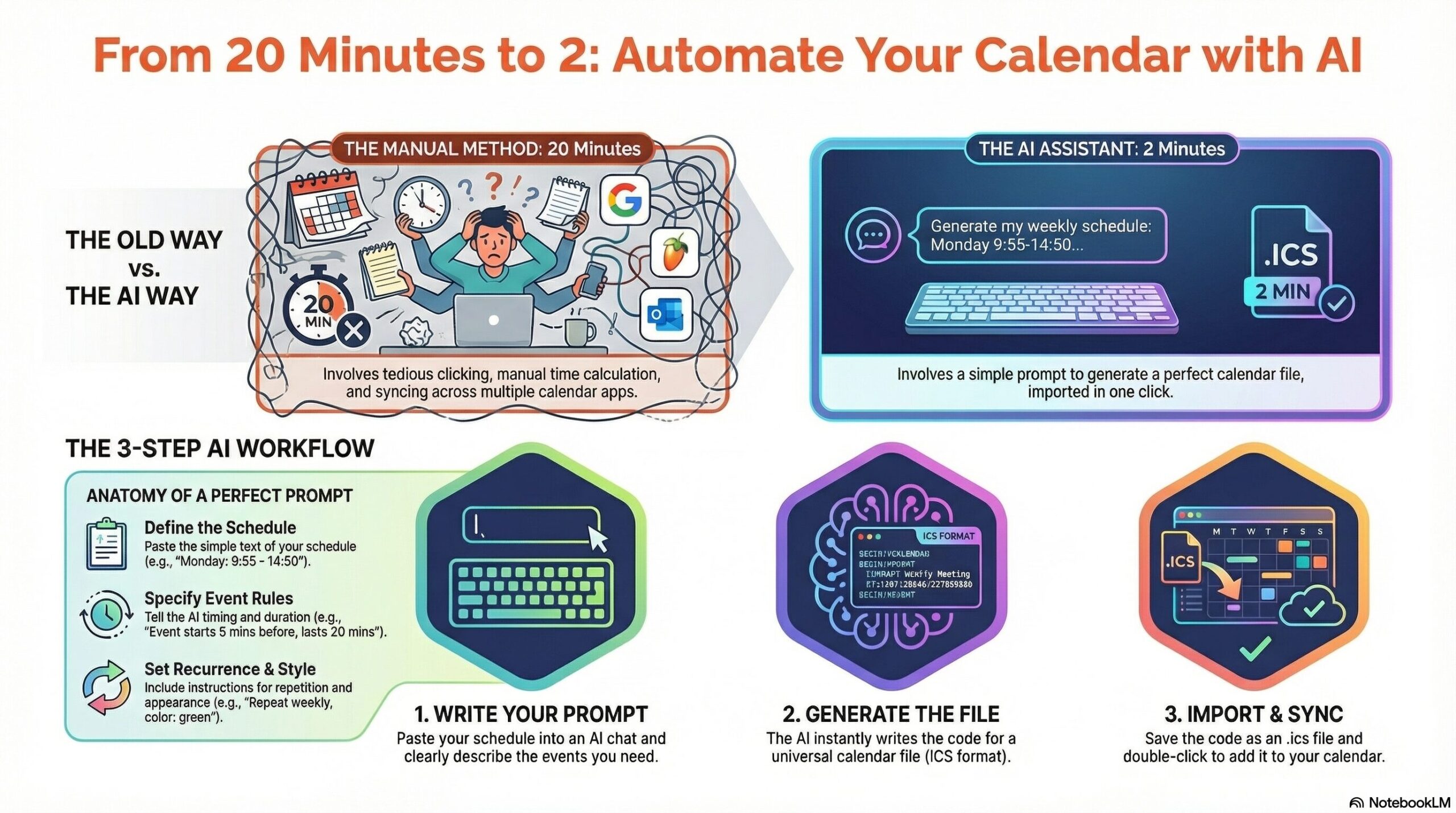
Time estimate: 15-20 minutes of tedious clicking per schedule update.
Why AI Is Your Solution
Instead of manually managing these updates, imagine having a personal assistant who understands your scheduling needs instantly. That’s what AI can do—and it’s far simpler than you’d think.
Here’s the revolutionary part: AI can generate calendar files in any format (ICS for Outlook, Google Calendar format, etc.) in seconds.
The AI-Powered Workflow: A Real Example
Let me show you exactly how this works with a practical example I recently implemented.
The Challenge: My daughter’s school schedule changes weekly. I need two reminder events per day:
- One 5 minutes before school starts, lasting 15 minutes after start time
- One 5 minutes before school ends, lasting 15 minutes after end time
This needs to repeat every week across multiple calendars. Manual entry? That’s 20+ minutes. AI entry? Try 2 minutes.
Step 1: Paste Your Schedule into AI
I took my daughter’s timetable and pasted it into an AI (like ChatGPT, Claude, or Gemini) with this prompt:
textI have a school schedule that changes weekly:
- Monday: 9:55 - 14:50
- Tuesday: 10:30 - 15:45
- Wednesday: 9:30 - 14:50
- Thursday: 8:00 - 14:00
- Friday: 8:00 - 12:40

Generate an ICS calendar file for Outlook with:
- 2 events per day
- Event 1: 5 minutes before school starts, lasting 20 minutes total
- Event 2: 5 minutes before school ends, lasting 20 minutes total
- All events repeat weekly
- Color: green
- Summary: "Pick up daughter - Morning/End of day"

Provide the ICS format I can import directly into Outlook.
Step 2: Get Instant Calendar Files
The AI generates a complete ICS file in seconds. No calculation errors, no forgotten events, all recurring patterns handled automatically.
Step 3: Import or Share in One Click
- For Outlook: Download the ICS file, double-click it → done
- For family: Ask the AI to email the file to your spouse/partner
- For Google Calendar: Ask the AI to generate Google Calendar format instead
Total time: 2 minutes instead of 20.
Why This Matters Beyond School Pickups
This approach works for any recurring schedule change:
- Students: Professor sends updated course timetable? Paste it, get calendar files
- Gym enthusiasts: Changing workout schedule? 30 seconds to update all calendars
- Parents: New after-school activities, sports schedules, or class additions? AI handles it
- Remote teams: Timezone-aware meeting scheduling across regions
- Shift workers: Complex rotating schedules become automated
The Beauty of Voice Integration
Don’t even want to type? Use voice-to-text:
“Create calendar events for my daughter’s school schedule. Monday 9:55 to 14:50, Tuesday 10:30 to 15:45…”
Dictate while driving to the gym. AI writes the prompt. Calendar files generated.
What You Need
- An AI tool (ChatGPT Plus, Claude, Google Gemini, or any LLM)
- Your schedule (copy-paste from email, screenshot, or text)
- A clear prompt (tell AI exactly what format and recurrence you need)
That’s it. No complex software, no steep learning curve.
The Bigger Picture: AI as Your Assistant
This is just one example of treating AI as your personal assistant. We often think of AI as a replacement for jobs, but the real value is as a multiplier for your time.
- 15-20 minutes saved per schedule update
- Zero manual calculation errors
- Automatic handling of complex recurring patterns
- Instant adaptation when schedules change
Over a year, if you update calendars 20 times? That’s 4-6 hours saved.
But more importantly, you’ve removed friction from your life. The task that felt tedious now takes seconds.

Prompt Template for Your Use
Here’s a reusable prompt you can adapt:
I need to create calendar events for: [describe your recurring activity]

Schedule:
[paste your schedule here]

Create an [ICS/Google Calendar/other format] file with:
- [Number] events per [day/week]
- Event timing: [specific requirements]
- Recurrence: [daily/weekly/custom]
- Color: [your choice]
- Description: [what the event is for]

Include all the code I need to import this into [Outlook/Google Calendar/other].
The Real Takeaway
AI isn’t about replacing you. It’s about working smarter. Calendar management is the perfect example: it’s a task that’s tedious, repetitive, and error-prone when done manually, but trivial for AI.
Stop spending 20 minutes clicking through calendar interfaces. Stop re-doing the same scheduling task over and over.
Treat AI as your personal assistant for these time-consuming tasks. In 2 minutes, what would take you 20 is done.
That’s not just efficiency—that’s your time back.