
We needed to pull years of archived webinar recordings out of an enterprise webinar platform and drop them into cloud storage. It sounds like a simple “download all” job. It wasn’t — and the reasons why make for a nice tour through session capture, CSRF tokens, on-demand file generation, and a live progress dashboard.
1. The problem: recordings don’t exist until you ask for them
The platform stores each webinar, but the downloadable video file is not a static asset sitting on a server. Before you can download a recording, the platform has to generate it — stitch the slides and video into a single MP4 on demand. In the UI this is a “Create file” button, and the generation can take anywhere from a few minutes to a few hours per webinar. Clicking through hundreds of events by hand, waiting for each one, and downloading it manually is not a plan.
So the goal was a script that could: list the events, request generation, wait, and download — unattended.
2. Why the official API isn’t enough
The platform ships a documented REST API, but it’s built for marketing data: analytics, registrations, attendee reports, event metadata. There is no public endpoint that hands you a recording file. A couple of quirks we hit while just listing events are worth noting, because they are common in these systems:
- The event-list endpoint required a date range and capped each query to a fixed window, so a multi-year export had to be split into chunks.
- Its pagination parameters were ignored — it returned the entire window in one response, which breaks naive “keep asking for the next page” loops.
The actual download lives in the portal’s internal web API — the same calls the browser makes when you click around the admin console. To use those, we first needed a logged-in session.
3. Capturing an authenticated session
Rather than fight a login form by hand, we drove a headless browser (Playwright) to log in once and save the session state — cookies and local storage — to a file. From then on, a plain HTTP client can replay those cookies and make fast, scriptable requests.
from playwright.sync_api import sync_playwright

with sync_playwright() as p:
    browser = p.chromium.launch(headless=True)
    ctx = browser.new_context()
    page = ctx.new_page()
    page.goto("https://portal.example.com/login")
    page.fill("#username", USERNAME)
    page.fill("#password", PASSWORD)
    page.click("button[type=submit]")
    page.wait_for_load_state("networkidle")
    ctx.storage_state(path="auth_state.json")   # cookies + storage saved here
    browser.close()
We then load those cookies into a requests.Session. One subtlety that cost us time: the server behaves differently without a realistic browser User-Agent, so we set one explicitly. Capturing the session in a browser also means SSO/redirect flows “just work” — we never have to reimplement them.
4. The CSRF gatekeeper
With valid cookies in hand, the internal endpoints still returned empty 200 OK responses — no error, no data, just nothing. The clue was a response header that said a CSRF token was requested. The app’s own JavaScript fetches a token from a dedicated endpoint and then sends it as a header on every subsequent call.
We discovered the exact mechanism by letting the real browser make the calls and inspecting its request headers:
# 1) fetch the CSRF token once
token = session.get("https://portal.example.com/webapi/csrfToken/token").json()["token"]

# 2) attach it to every internal API call
session.headers["X-PORTAL-CSRF-TOKEN"] = token
Lesson: if an authenticated endpoint returns an empty body with
200 OK, suspect a missing CSRF/anti-forgery header before you suspect your cookies.
5. The generate → poll → download workflow
With a session and a token, the real pipeline is three steps per webinar:
- Request generation. A
POSTto the “create file” endpoint, with parameters derived from the event’s own metadata (does it have slides, video, or both; notification email; etc.). - Poll for status. A
GETreturns a status object. When it reports success, it also includes a signed download URL pointing at a separate CDN host. - Stream the file. Download the MP4 in chunks and write it to disk under a clean, predictable file name.
def status(eid):
    data = session.get(f"{API}/singleFileArchive/{eid}?sessionId=1").json()
    sfa = data.get("archiveData") or {}
    if sfa.get("statusCd") == "Success" and sfa.get("downloadUrl"):
        return "ready", sfa["downloadUrl"]
    if not sfa.get("requestId"):
        return "create", None          # never requested -> generate it
    return "in_progress", None          # still being built
If the status says the item was never requested, we send the create call; if it’s still building, we wait and poll again later. Interesting detail: the API exposes the recording’s duration and resolution, but not its byte size — so the only reliable size is the Content-Length header at download time.
6. Being a good API citizen
The hard limit: max 4 downloads in parallel. The platform explicitly asked us not to download more than four files at the same time. We treat that as a non-negotiable ceiling: a worker pool caps concurrent downloads at four, and we also throttle how many recordings are being generated at once (another four “in flight”), so we never hammer the backend with dozens of simultaneous generation jobs.
MAX_PARALLEL_DOWNLOADS = 4   # platform requirement — do not raise
MAX_INFLIGHT = 4             # cap concurrent "generate" jobs too

with ThreadPoolExecutor(max_workers=MAX_PARALLEL_DOWNLOADS) as pool:
    for eid, url in ready_to_download:
        pool.submit(download_file, eid, url)
Long, multi-hour runs need more than good manners, though. We added:
- Keep-alive pings. A background thread hits the session’s “server time” endpoint every 45 seconds — the same trick the web app uses to stay logged in.
- Automatic re-login. Sessions still expire. When a call gets redirected to the login page, the script raises a dedicated signal, silently re-authenticates in a headless browser, and resumes — no human needed.
- Resumable state. Every item’s status is persisted to a small state file. A crash, a restart, or an expired session never re-downloads a finished file; the run simply picks up where it left off.
- Clean output + cloud sync. Files are named by date and title and written straight into a folder that syncs to cloud storage.
7. A live progress dashboard
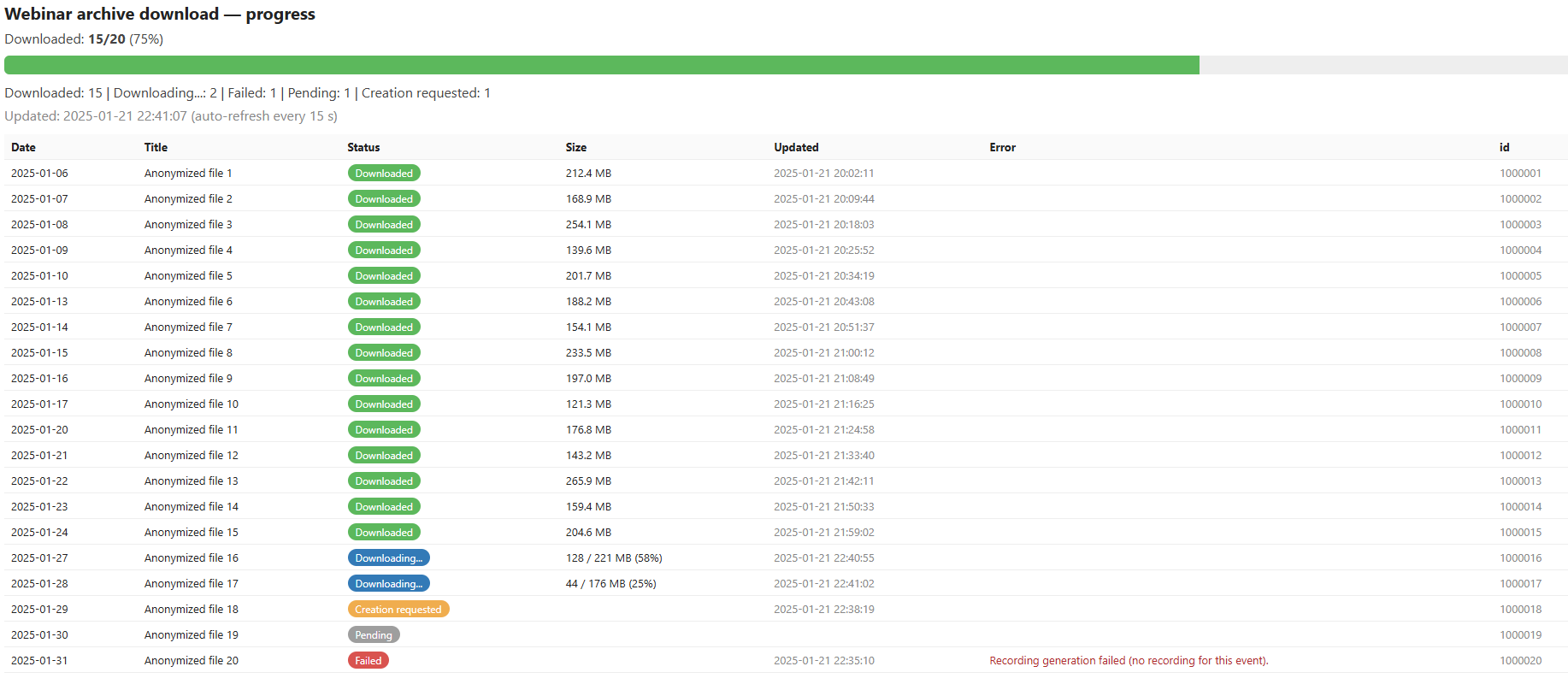
Unattended jobs are nerve-wracking when you can’t see them. So the script writes a self-contained HTML dashboard that anyone can open in a browser. Each webinar moves through clear states:
| Status | Meaning |
|---|---|
| Pending | Queued, not started yet |
| Creation requested | Generation asked for; waiting on the platform |
| Downloading… | Streaming now — shown live as X / Y MB (Z%) |
| Downloaded | Finished, with final size |
| Failed | No recording exists (e.g. a test template) |
Three small design choices make it feel alive:
- The page carries a
<meta http-equiv="refresh">tag so the browser reloads itself every few seconds. - The file is rewritten on every status change, and a background thread also rewrites it on a short timer — so even during a long download the timestamp and the live
MB / %keep moving. - Writes are atomic (write to a temp file, then rename) so the browser never reads a half-written page.
The result is a single glanceable page: a progress bar, a one-line summary (Downloaded: 3 · Downloading: 2 · Pending: 13 · Failed: 1), and a table that fills in with green “Downloaded” rows as the night goes on.
8. Takeaways
- When a public API stops short, a captured browser session plus the app’s own internal API is a powerful, legitimate combination for work you’re authorized to do.
- Expect on-demand generation: many “download” features are really “request, wait, then download” pipelines.
- CSRF tokens and User-Agents are the two most common reasons a logged-in request silently returns nothing.
- For anything long-running, invest early in throttling, keep-alive, auto re-login, resumability, and observable progress — they turn a fragile script into something you can start and walk away from.
- And always respect the platform’s limits. Ours was simple and firm: never more than four downloads in parallel.
Written up from a real automation project. Platform name, credentials, and internal URLs omitted on purpose — the techniques are what transfer.