
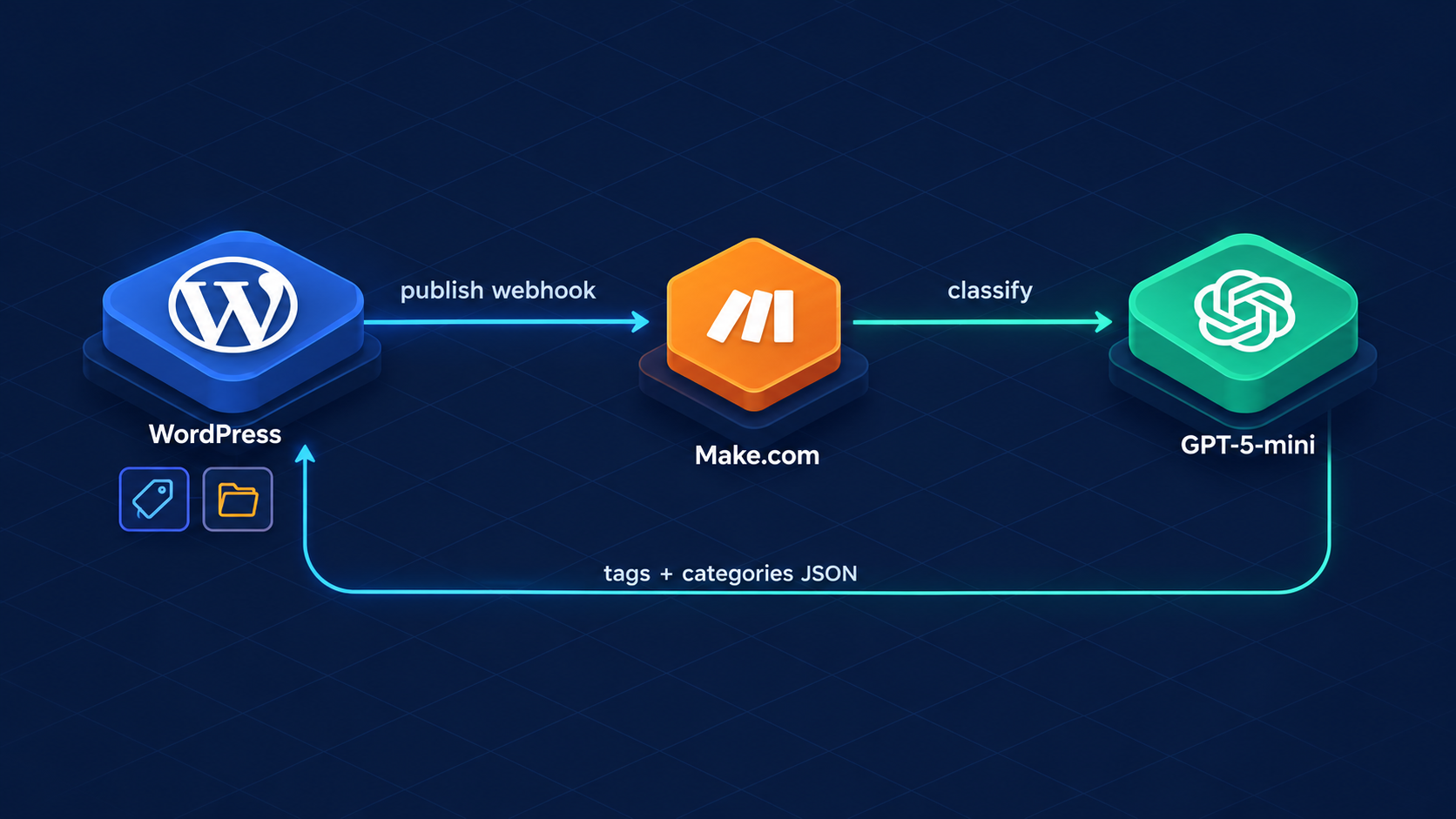
I recently ran a bulk-classification pass over this blog — 65 posts tagged and categorized by an AI model with a controlled vocabulary. That fixed the archive, but it created a new chore: every future post would need manual tagging, or a re-run of the batch script. So I wired up a small pipeline that does it automatically, ~30 seconds after I hit Publish. Here’s how it’s built.
1. The architecture: push, not poll
The flow is entirely event-driven. WordPress pushes post data to a webhook the moment a post goes live — nothing polls, nothing idles:
- WordPress
transition_post_statushook detects draft → publish, POSTs{id, title, text}to a Make.com webhook - Make.com sends the title + content to GPT-5-mini with a controlled tag vocabulary
- The model replies with strict JSON:
{"tags":[...],"categories":[...]} - Make POSTs the result back to a custom WordPress REST endpoint
- WordPress resolves tag/category names to terms and appends them — never overwriting tags I set by hand
Cost per post is fractions of a cent, and the scenario consumes one execution per publication — I publish every few days, so this is effectively free.
2. The WordPress side: one mu-plugin
A single must-use plugin handles both directions — firing the webhook on publish, and receiving the results. Note transition_post_status rather than publish_post: the check $new === 'publish' && $old !== 'publish' means editing an already-published post doesn’t re-trigger the pipeline.
<?php
define('ORPI_AUTOTAG_HOOK',   'https://hook.eu2.make.com/YOUR_HOOK_ID');
define('ORPI_AUTOTAG_SECRET', 'YOUR_WP_ENDPOINT_KEY');   // Make -> WP auth
define('ORPI_MAKE_APIKEY',    'YOUR_MAKE_API_KEY');      // WP -> Make auth

add_action('transition_post_status', function ($new, $old, $p) {
    if ($new !== 'publish' || $old === 'publish') return;
    if ($p->post_type !== 'post') return;
    wp_remote_post(ORPI_AUTOTAG_HOOK, array(
        'timeout' => 15,
        'headers' => array('x-make-apikey' => ORPI_MAKE_APIKEY),
        'body' => array(
            'id'    => $p->ID,
            'title' => html_entity_decode(get_the_title($p->ID)),
            'text'  => mb_substr(wp_strip_all_tags($p->post_content), 0, 8000),
        ),
    ));
}, 10, 3);
The receive endpoint registers POST /wp-json/orpi/v1/autotag. It validates the key, then appends terms with wp_set_post_terms(..., true) — the true means append mode, so AI suggestions merge with any tags I picked manually instead of replacing them. It also strips the “Uncategorized” default once real categories exist.
3. Two secrets, two directions
Early on I made a classic mistake: one shared secret for both calls. They are different credentials protecting different edges:
- WP → Make: Make’s own webhook API key, sent as the
x-make-apikeyHTTP header. Rotating it invalidates inbound webhook calls only. - Make → WP: my own endpoint key, sent as the
keyfield in the JSON body. Rotating it invalidates the callback only.
With both in place, a leaked webhook URL alone is useless — Make rejects calls without the header — and the WP endpoint can’t be fed forged tags without its own key.
4. The Make scenario: five modules
- Custom webhook — receives
id,title,text - OpenAI: Generate a completion — model
gpt-5-mini,response_format: json_object,reasoning_effort: minimal - JSON → Parse — extracts
tags[]andcategories[]from the model output - JSON → Create — assembles the request body
{key, post_id, tags, categories} - HTTP → POST — sends it to the WP endpoint, auth type None (the key lives in the body)
The system prompt is the real workhorse: it hands the model a controlled vocabulary — ~300 canonical tag names generated from my existing corpus — plus a fixed list of 12 categories, and instructs it to pick 3–6 tags for precision over recall. That constraint is what prevents tag drift like “AI Application” vs “AI Applications” fragmenting the archive.
5. Bugs I hit (so you don’t)
- “On demand” scheduling: an Active scenario with On demand scheduling queues webhook payloads but never consumes them. Switch to Immediately as data arrives.
max_completion_tokens400: the blueprint field carried"2048"as a string; the OpenAI API wants an integer — clear the field or enter the number unquoted.- 403 from the endpoint: the HTTP module still held a placeholder
key. The error surfaced as “Settings couldn’t be applied” — the response body had the real story. - Queued test payloads: my early curl test sat in the webhook queue and nearly tagged a real article with sample data. Worth adding a guard (or just purge the queue) before go-live.
6. Result
First live run: my post about reverse-engineering a webinar portal’s internal API was published with zero tags, and came back wearing Automation, Cloud Storage, CSRF, HTTP, Playwright — plus categories Automation & Integrations and Cloud & AWS. Accurate enough that I didn’t touch it.
The anonymized Make blueprint is here if you want to import it: wp-autotag-blueprint.json. You’ll need to create your own webhook, reconnect your OpenAI account, and set both secrets.