
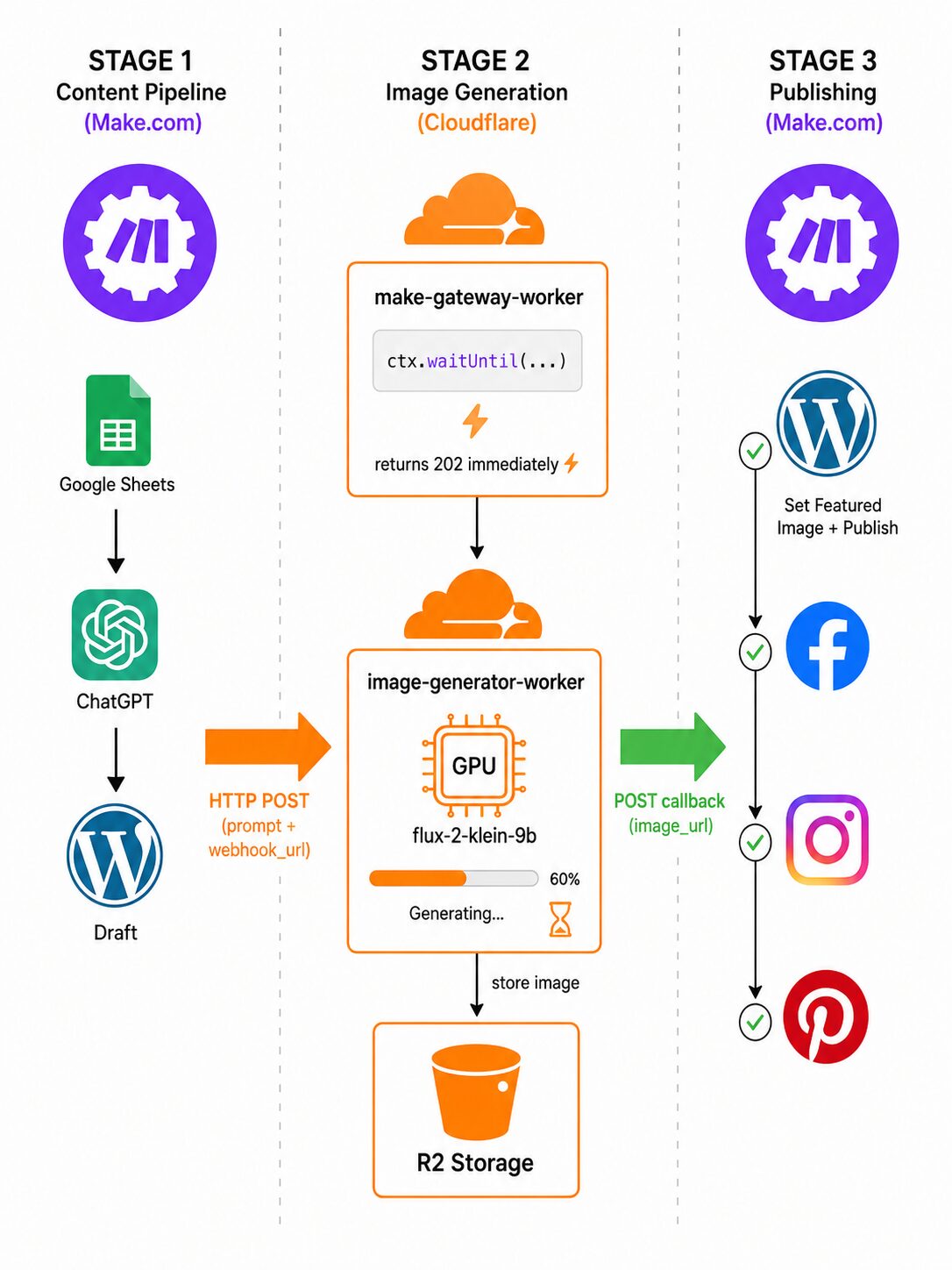
How I solved the 40-second timeout problem by splitting content automation into three decoupled stages — without rewriting a single Make.com scenario.
May 2026 · 10 min read
Background
A few months ago I wrote about automating WordPress article publishing and social media distribution with Make.com and LLMs . The pipeline was working great: read a recipe row from Google Sheets, generate content with ChatGPT, publish a WordPress draft, generate a featured image with DALL-E 3, and push to Facebook, Instagram and Pinterest — all in one Make.com scenario.
Then OpenAI deprecated DALL-E 3 in their API. The replacement models are capable, but they are also significantly slower. What used to complete in a few seconds now routinely hits Make.com’s hard 40000 ms HTTP timeout.

⚠️ The problem in one line AI image generation with modern models can easily take 30–120 seconds. Make.com’s HTTP module times out at 40 s. You can’t just wait synchronously.
📌 Important disclaimer before we start
The solution below usesctx.waitUntil(), which is simple and works well for short-to-medium image generation times. However, it has a hard 30-second wall-clock limit after the response is sent — if the AI takes longer, the job is silently cancelled with no retry. For a production system with guaranteed delivery you should use Cloudflare Queues instead (more on this at the end of the article). For my current load — a few images per day with Flux models averaging 8–15 s —ctx.waitUntil()is sufficient and costs nothing extra beyond the normal per-request charge.
Design Goals
Before rebuilding everything I set a few constraints:
- Don’t rewrite the Make.com scenario. It handles OAuth 2.0 connections, social publishing and data routing — replacing it would take days.
- Keep the same final callback shape. Make.com should still receive a webhook with
image_url,post_idandrow_numberexactly as before. - No always-on server. Cloudflare Workers run at the edge, scale to zero, and have generous free-tier limits — a perfect fit for sporadic batch jobs.
- Use Workers AI models. Cloudflare provides Flux models directly in the Workers AI binding, with no extra API keys and no egress costs.
Three-Stage Architecture
The key insight is to decouple generation from publishing. Make.com fires and forgets to Cloudflare, which does the heavy work in the background and calls Make.com back when done.

Stage 1 – Content generation & handoff
The first Make.com scenario runs just as before: read a topic from Google Sheets, generate the article body with ChatGPT, create a WordPress post in Draft status, record the post ID and row number back in Sheets, then fire an HTTP POST to the Cloudflare gateway worker and immediately move on – it does not wait for a response body (maybe I need to handle success/failure…)

The payload sent from Make.com to the Cloudflare gateway looks like this:
{
  "prompt": "Shot on iPhone 17, candid food-blogger style photo of ...",
  "model": "@cf/black-forest-labs/flux-2-klein-9b",
  "webhook_url": "https://hook.eu2.make.com/xxxxxxxxxxxxxxxx",
  "post_id": "12345",
  "row_number": "48"
}
Stage 2 – The Cloudflare gateway worker
This is where the magic happens. The gateway worker uses ctx.waitUntil() — a Cloudflare-specific API that lets you run async work after the HTTP response has already been returned to the caller. The caller (Make.com) gets an immediate 202 Accepted and never blocks.
make-gateway-worker/src/index.tsexport default {
async fetch(request: Request, env: Env, ctx: ExecutionContext): Promise<Response> {
// ... auth checks ...
const jobId = crypto.randomUUID();
// 🔑 Fire-and-forget: returns 202 immediately,
// image generation continues in the background
ctx.waitUntil(
processImageJob(jobId, body, env).catch((err) =>
console.error(`[${jobId}] Job failed:`, err)
)
);
return new Response(
JSON.stringify({ job_id: jobId, status: "accepted" }),
{ status: 202, headers: { "content-type": "application/json" } }
);
},
} satisfies ExportedHandler<Env>;
💡 What is ctx.waitUntil()? And do you pay for it?
Normally a Cloudflare Worker shuts down as soon as it sends its response. ctx.waitUntil(promise) extends the Worker’s lifetime until the promise settles.
Cost: Cloudflare bills CPU time, not wall-clock time. Waiting for a network response (like AI inference) does not consume CPU — so the wait is effectively free.
Limit: The extension lasts at most 30 seconds after the response is sent. If the promise hasn’t resolved by then, it is cancelled silently. For Flux models (8–15 s) this is fine; for slower models or retries, use Cloudflare Queues.
The processImageJob function then calls the image-generator worker via a Service Binding (a private, zero-latency in-Worker call — no public URL needed), uploads the result to Cloudflare R2 object storage, and fires the callback webhook.
make-gateway-worker/src/index.tsasync function processImageJob(jobId: string, body: MakeRequest, env: Env): Promise<void> {
// 1. Call image-generator via Service Binding (internal, no network hop)
const aiResponse = await env.IMAGE_WORKER.fetch("https://internal/generate", {
method: "POST",
headers: {
"content-type": "application/json",
"X-Internal-Secret": env.INTERNAL_SECRET,
},
body: JSON.stringify({ prompt: body.prompt, model: body.model }),
});
// 2. Upload binary image to R2
const imageBuffer = await aiResponse.arrayBuffer();
const fileName = `${jobId}.png`;
await env.IMAGE_BUCKET.put(fileName, imageBuffer, {
httpMetadata: { contentType: "image/jpeg" },
});
const imageUrl = `${env.R2_PUBLIC_BASE_URL}/${fileName}`;
// 3. Call back Make.com with the result
await callMakeWebhook(body.webhook_url, {
job_id: jobId,
status: "success",
image_url: imageUrl,
post_id: body.post_id,
row_number: body.row_number,
}, env.WEBHOOK_SECRET);
}
The image-generator worker – handling Flux models
Cloudflare Workers AI provides direct access to the Black Forest Labs Flux model family. Here I ran into an interesting gotcha: flux-1-schnell accepts plain JSON input, but the newer flux-2-klein-9b requires a multipart/form-data body. Passing it the same way triggers an AiError 5006.
The trick is to use new Response(formData) to let the runtime serialize the FormData and generate the correct Content-Type header with boundary — then pass that stream to env.AI.run():
image-generator-worker/src/index.ts// flux-2-klein-9b and other flux-2 models — requires multipart
if (model.includes("flux-2")) {
const form = new FormData();
form.append("prompt", prompt);
form.append("width", "1024");
form.append("height", "1024");
// new Response(form) serializes FormData and sets the correct
// Content-Type header including the multipart boundary
const formResponse = new Response(form);
const formStream = formResponse.body!;
const formContentType = formResponse.headers.get("content-type")!;
const resp = await env.AI.run(
model as Parameters<typeof env.AI.run>[0],
{ multipart: { body: formStream, contentType: formContentType } } as any,
) as { image: string };
const binary = Uint8Array.from(atob(resp.image), (c) => c.codePointAt(0)!);
return new Response(binary,{ headers: { "content-type": "image/jpeg" } });
}
// flux-1-schnell — plain JSON input
if (model.includes("flux")) {
const resp = await env.AI.run(
model as Parameters<typeof env.AI.run>[0],
{ prompt },
) as { image: string };
const binary = Uint8Array.from(atob(resp.image), (c) => c.codePointAt(0)!);
return new Response(binary, { headers: { "content-type": "image/jpeg" } });
}
Here is what a successful generation looks like in the worker logs:

Stage 3 – Make.com callback: publish everywhere
When the worker fires the callback, a second Make.com scenario wakes up. It downloads the image from the R2 URL, uploads it to WordPress Media Library, sets it as the featured image of the draft post (identified by post_id), changes the post status to Published, then fans out to Facebook, Instagram and Pinterest.


The callback payload sent by the worker:
{
  "job_id": "a6b72152-d0fe-498d-8af3-c362d0967503",
  "status": "success",
  "image_url": "https://img.example.com/a6b72152-d0fe-498d-8af3-c362d0967503.png",
  "post_id": "12345",
  "row_number": "48"
}
Flux Model Comparison
Since I was switching away from DALL-E anyway, I tested both Flux models available in Cloudflare Workers AI. Here is a quick comparison:

For food-blogger style social media imagery I settled on flux-2-klein-9b. The photorealistic quality is noticeably better and 8–15 seconds is perfectly acceptable in an async pipeline.
✅ Gotcha: flux-2 requires multipart
If you get AiError: 5006: required properties at '/' are 'multipart' when calling env.AI.run(), you are hitting the flux-2 multipart requirement. Use new Response(formData) to get a correctly-bounded multipart stream — see the code example above.
Infrastructure Setup
Wrangler configuration
Two workers, each with its own wrangler.json:
make-gateway-worker/wrangler.json{
"name": "make-gateway-worker",
"main": "src/index.ts",
"services": [
{
"binding": "IMAGE_WORKER",
"service": "image-generator-worker"
}
],
"r2_buckets": [
{ "binding": "IMAGE_BUCKET", "bucket_name": "my-images" }
],
"vars": {
"R2_PUBLIC_BASE_URL": "https://img.example.com"
}
}
image-generator-worker/wrangler.json{
"name": "image-generator-worker",
"main": "src/index.ts",
"ai": { "binding": "AI" },
"compatibility_flags": ["nodejs_compat"]
}
Secrets
Three secrets are needed, set with wrangler secret put:

- MAKE_SECRET — shared secret between Make.com and the gateway worker (sent as
X-Make-Secretheader) - WEBHOOK_SECRET — sent as
x-make-apikeyheader back to the Make.com webhook to authenticate the callback - INTERNAL_SECRET — internal secret between the gateway and image-generator workers (service binding is already private, but this adds a second layer)
Testing the callback locally
You can simulate the worker callback with a single curl command:
curl -X POST "https://hook.eu2.make.com/your-webhook-id" \
  -H "Content-Type: application/json" \
  -H "x-make-apikey: your-webhook-secret" \
  -d '{
    "job_id": "a6b72152-d0fe-498d-8af3-c362d0967503",
    "status": "success",
    "image_url": "https://img.example.com/test.png",
    "post_id": "12345",
    "row_number": "48"
  }'
End-to-End Flow Summary
- Make.com Stage 1 fires
Reads recipe row from Sheets, generates content with ChatGPT, creates a WordPress Draft, updates Sheets withpost_id, sends HTTP POST to Cloudflare gateway withprompt,model,webhook_url,post_id,row_number. - Gateway worker returns 202 immediately
Validates the request, generates ajob_id(UUID), kicks offprocessImageJob()viactx.waitUntil(), and responds to Make.com with{ job_id, status: "accepted" }in <300 ms. - Image generation runs in the background
Callsimage-generator-workervia Service Binding with the prompt. Worker callsenv.AI.run()with the appropriate input format (multipart for flux-2, plain JSON for flux-1). Takes 8–60 seconds. - Image uploaded to Cloudflare R2
The binary image is stored as{job_id}.pngand served from a custom domain mapped to the R2 bucket. - Callback fires to Make.com Stage 3
The worker POSTs{ status, image_url, post_id, row_number }to the Make.com webhook URL with the sharedx-make-apikeyheader. - Make.com Stage 3 publishes everywhere
Downloads image → uploads to WordPress Media → sets as featured image → publishes post → posts to Facebook Pages → Instagram Business → Pinterest.
Lessons Learned
- The real fix was switching models, not raising the timeout.
The obvious “solution” to a timeout error is to increase the timeout. I didn’t do that. Instead I switched from DALL-E 3 (deprecated, slow, expensive) to Cloudflare Workers AI Flux models — which run on Cloudflare’s own infrastructure, have no extra API key, and generate images in 8–15 s. The async architecture made that feasible; the model switch made it fast. ctx.waitUntil()works — but has a 30-second ceiling.
It costs nothing extra (Cloudflare bills CPU time, not I/O wait time), but if the promise doesn’t settle within 30 s of the response being sent, it is cancelled silently. For my current load this is fine. For guaranteed delivery at scale, the right tool is Cloudflare Queues.- Service Bindings beat HTTP for inter-worker calls.
No network latency, no public URL to secure, and you don’t consume a request from your plan quota. - Flux-2 requires multipart — the TypeScript types lie.
env.AI.run()TypeScript types forflux-2-klein-9baccept{ prompt }, but the runtime throwsAiError 5006. Always check the model’s actual documentation page. - R2 + custom domain is the easiest image CDN.
Zero configuration, served globally from Cloudflare’s edge, and the URL is stable and predictable. - Don’t rewrite working automations.
Splitting the pipeline at a clean boundary (HTTP callback) let me keep all the Make.com logic — OAuth connections, visual flow, retry queues — completely intact.
Conclusion
The async pattern — accept fast, process slow, callback when done — is a classic and it works beautifully at the Cloudflare Workers layer. The full solution runs on zero-infrastructure (no servers, no databases), scales automatically, and lives comfortably within Cloudflare’s free tier for a recipe blog.
The single most important decision was changing models, not fighting the timeout. Switching from DALL-E 3 to Flux on Cloudflare Workers AI eliminated the external dependency, removed the latency spike, and cut costs — the async architecture was then straightforward to layer on top.
🔜 What’s next — Cloudflare Queuesctx.waitUntil() solves the problem pragmatically, but it has that 30-second ceiling and no built-in retry. The production-grade upgrade is Cloudflare Queues: the gateway worker enqueues a message and returns 202 immediately; a separate queue consumer Worker does the image generation with automatic retries and no time pressure. I’ll explore that migration in an upcoming article.
Related: Automating Content Creation and Publishing with Make.com and LLM
© 2026 · Built with Cloudflare Workers AI